A faceless storytelling channel can have a strong identity without putting its creator on camera. Original characters, a recognizable visual world, and clear stories give viewers something to return to. GPT-6 Astra can help organize the creative plan and written material, while O4Prompts by OrigaStock helps you prepare the image and video prompts. This seven-step workflow takes an original winter adventure from an idea to a first episode you can publish and improve.
What GPT-6 Astra and O4Prompts Contribute
OpenAI's official model documentation describes Astra as a model for demanding work involving reasoning, tools, and judgment. In this workflow, give it the story brief, character rules, and desired output so it can help develop scripts, shot lists, and revisions. Select Astra where it is available to your account and client.
O4Prompts generates prompts for images and videos. Use it to express composition, lighting, color, framing, and movement, then copy those instructions into a compatible generation engine. Image and video creation use the selected engine's supported models and controls. Editing and publishing complete the workflow.
The example below follows three male travelers through a snowy forest. It is an original story concept built around a quiet encounter with wolves. The same process can support other channel formats, including small science-fiction stories, visual mysteries, or gentle animated adventures.
1. Choose a Channel Promise You Can Repeat
Give viewers a clear reason to watch the next episode. A useful promise might be “short winter adventures where three travelers solve one unexpected problem.” That establishes the world, cast, and story size without requiring a new visual identity every time.
For the first episode, the travelers discover that a wolf is standing across their path. The youngest traveler notices tracks leading around a fallen tree. Instead of confronting the pack, the group finds another route. The story turns on observation and a simple decision that can be shown visually.
Choose a manageable pilot length, such as approximately one minute, as a planning target. Decide whether it will use narration, dialogue, or only sound and images. Keep the production scope small enough that you can finish and assess a complete episode.
2. Develop the Script with GPT-6 Astra
Open ChatGPT for the writing stage and choose Astra if it is offered in your model selector. Describe the audience, format, story idea, and boundaries. Ask for a compact script and shot list that you can review together.
“Develop an original approximately one-minute animated adventure for a faceless storytelling channel. Three male travelers meet a calm wolf pack in a snowy forest. The youngest notices a safe route around a fallen tree, and the group follows it. Use a clear setup, discovery, decision, and ending. Keep the story gentle, with no fighting and minimal narration. Return seven shots, each with its purpose, visible action, suggested framing, and any narration. Keep the cast and location consistent.”
Read the result as a production brief. Check whether every event can be shown and whether the ending answers the opening problem. Remove unnecessary dialogue and actions that would demand several complicated movements in a single shot.
3. Define Three Recognizable Characters
Keep a short character guide beside the script. Record the details that should survive every camera angle. For this story, use three distinct silhouettes and restrained winter clothing:
- Ivo, the elder: silver hair, a short white beard, a charcoal fur-lined coat, and a simple wooden walking staff.
- Samir, the companion: tan skin, short dark hair, and an olive wool coat with a practical hood.
- Leon, the younger traveler: short chestnut hair, a pale gray winter cloak, and a curious, attentive expression.
Give the environment equally clear rules: a pine-and-birch forest, soft falling snow, layered mist, and cold gray-blue daylight. Use a painterly animated-film treatment with tactile fabric and softly simplified faces.
Approve a reference frame before developing the whole episode. Save the descriptions with it and reuse the reference wherever the selected engine supports that input. Compare each new result for facial changes, costume drift, and differences in body proportions.
4. Create the Hero Frame with O4Prompts
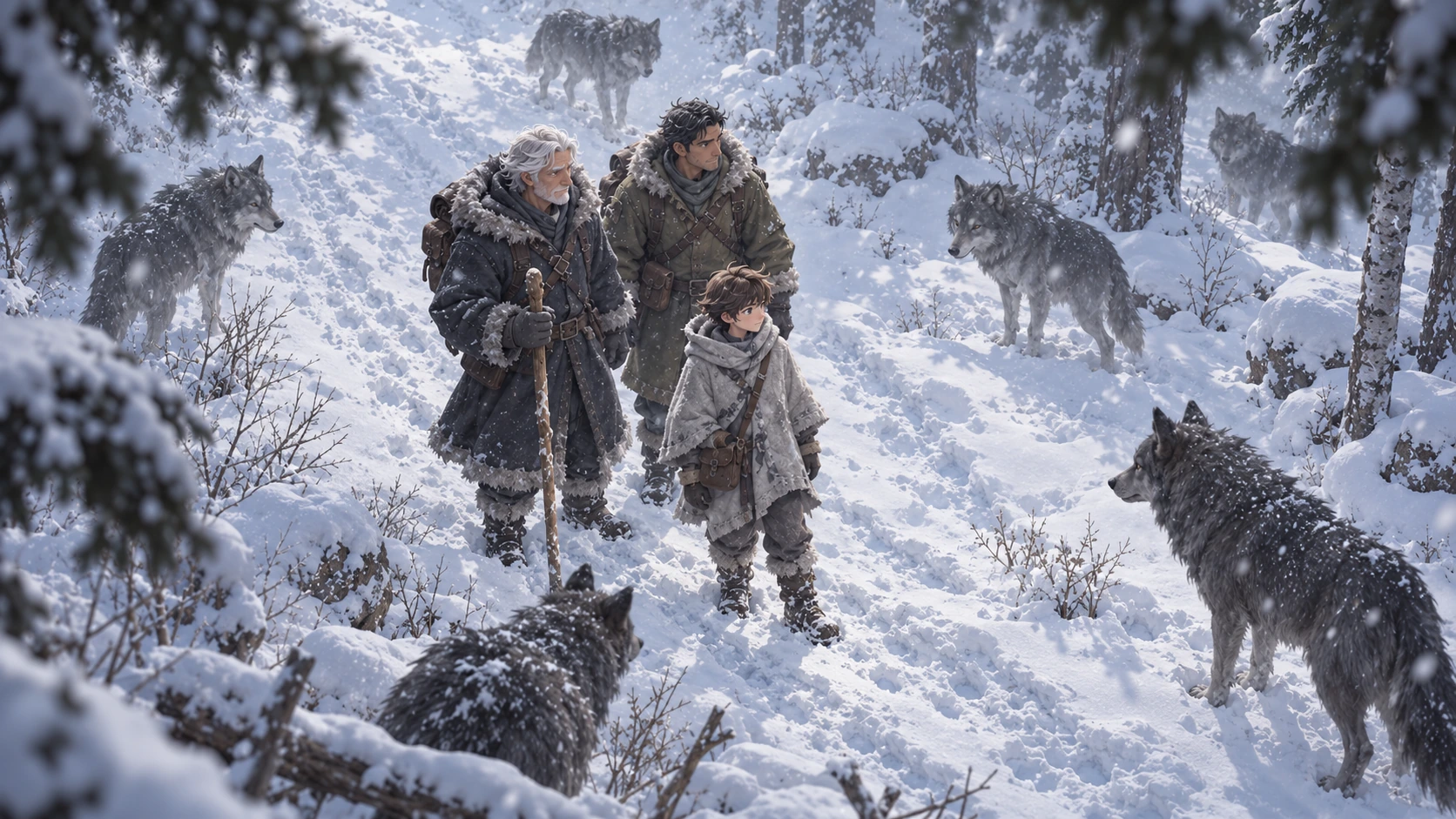
Use O4Prompts Cinematic Shots to develop the main frame. Start with a wide, eye-level view that establishes the three travelers, the forest, and the wolves. A wolf in the near foreground can create depth while the human group remains readable in the middle distance.
Use Composition Lab to describe the triangular grouping and the space between the travelers and the pack. Use Color Lab to coordinate the charcoal, olive, and pale gray clothing with the muted winter environment.
Example image prompt
“Create an original painterly 3D animated-film still in a snowy pine-and-birch forest. Exactly three male travelers stand in a close triangular group: a silver-haired elder in a charcoal fur-lined coat holding a wooden staff, a tan-skinned adult in an olive wool coat, and a chestnut-haired teenage boy in a pale gray cloak slightly ahead of them. A calm dark-gray wolf stands in profile in the near foreground, looking toward the travelers; smaller wolves remain in the mist behind them. Use a wide eye-level camera, tall tree trunks, layered winter haze, soft falling snow, and restrained gray-blue daylight. Keep the faces gently simplified and the clothing tactile. The atmosphere is quiet and curious. No text, logos, watermarks, or interface elements.”
Copy the prompt into your chosen image generator and inspect the result. Count the travelers, check the hands and staff, and confirm that the wolves remain calm. Preserve the approved frame as the episode's visual reference.
5. Turn the Story into Seven Distinct Shots
Give every shot a purpose. A starting sequence could establish the forest, reveal the wolf, show Leon noticing the tracks, show the route past the tree, capture Ivo's decision, follow the group moving away, and finish with the wolves watching quietly.
Change camera angle to reveal information. A wide frontal view establishes the encounter. A view from behind the travelers lets the audience see what they are looking at. A lower side angle can follow their first steps. Keep the spatial relationships and light consistent between those viewpoints.
Use the Video Prompt Builder for the visible action and Camera Movement for the camera path. Higgsfield's official camera-control guide explains how prompt direction can work alongside explicit camera settings. Check what the selected model supports and set timing in the generation tool.
Example motion prompt
“Use the approved three-traveler winter frame as the visual reference. In one continuous shot, Leon lowers his gaze toward the tracks and gently turns his head toward the open route. Ivo and Samir remain beside him. The foreground wolf stays calm, shifting its weight slightly while snow drifts through the forest. The camera makes a slow forward dolly and settles on the travelers' reaction. Preserve the three faces, clothing, staff, forest layout, and cold daylight. No cuts, additional people, sudden movements, or text.”
Review the full clip. If several actions interfere with one another, simplify the performance or split it across shots.
6. Edit the Episode around the Story
Assemble approved clips in the order that makes the discovery clear. Trim pauses that do not add tension or meaning. Make sure the audience sees the tracks before the travelers change direction; otherwise the decision can feel unexplained.
Add narration only where it contributes something the images cannot communicate. Let footsteps, wind, fabric movement, and a restrained musical bed support the setting. Leave space for a quiet ending instead of filling every moment with sound.
Check continuity across the edit. The elder's staff, the boy's cloak, the adult's hood, and the direction of travel should remain coherent. Correct distracting changes before exporting the finished episode.
7. Publish a Pilot and Improve the Next Episode
Use a title that describes the story's main question, such as “Why the Wolves Let Them Pass.” Choose a thumbnail with a readable interaction and make sure it matches what happens in the episode.
After publishing, review the audience information available for your video. Look at where viewers leave, which moments attract attention, and whether comments show that the story was understood. Use those observations to revise the opening, pacing, or clarity of the next episode.
Keep a reusable production pack: character descriptions, approved references, shot prompts, and editing notes. It can help the channel develop a recognizable world. Evaluate performance using the channel's actual views, audience response, and revenue data as it develops.
Frequently Asked Questions
Does a faceless channel mean there are no people?
No. It means the creator does not need to appear as the on-camera host. Animated characters can still carry the story.
Does GPT-6 Astra directly render the film?
In this workflow, Astra helps develop the written creative plan. Image and video outputs use the appropriate generation tools, followed by editing.
Can O4Prompts generate or publish an episode?
O4Prompts prepares prompts. Copy them into a compatible engine, review the generated assets, and assemble and publish the episode with your chosen tools.
Build your first episode around one clear story. Develop the brief with GPT-6 Astra, prepare its visual and motion instructions with O4Prompts, and turn the approved shots into a channel you can keep improving.