A quiet jungle, an older storyteller, and a moment that makes the viewer listen: a faceless documentary concept can begin with something this simple. You can develop the script and shot plan with Claude Fable 5, then use O4Prompts by OrigaStock to prepare the visual instructions for your chosen image and video generators. This guide follows an original jungle story from its opening portrait to a finished short, with practical prompts you can adapt.
Find a Faceless Documentary Idea Worth Following
A faceless channel lets you tell stories without recording yourself on camera. It can use narration, environments, close observations, and an invented character who gives the sequence a consistent point of view. In this example, the on-screen guide is an AI-created older woman; she gives the story a human presence while the creator works behind the scenes.
Choose a specific question rather than an entire subject. “What changes when the jungle becomes quiet?” is a manageable starting point. “Everything about tropical wildlife” demands a much larger research and production effort. A focused question helps you decide which images belong in the film and which can wait for another episode.
Our concept is a fictional nature story called A Pause Beneath the Canopy. The guide stops on a forest trail, asks for silence with a small gesture, and listens while the camera reveals the surrounding leaves, water, and canopy. The documentary style comes from observation, patient framing, and environmental sound.
If you turn the format into factual wildlife education, verify species, locations, behavior, and any numbers before publishing. Present generated scenes as AI-created illustrations so the audience understands how the imagery was made.
Use Claude Fable 5 to Shape the Story
Claude Fable 5 is an Anthropic model for demanding reasoning and knowledge work. Here, its role is to help organize a creative brief, draft narration, and revise a shot plan. Anthropic's official Claude Fable 5 reference lists it as a legacy model and identifies Fable 5.1 as the current version. Check which model is available in your account before starting.
Give Claude a clear audience, format, and story boundary. Ask for visible actions that fit individual shots, then read the draft aloud. A sentence that looks good on the page may be too long for a quiet close-up or too abstract to illustrate.
Example script-planning prompt
“Develop an original 45-second fictional nature short called A Pause Beneath the Canopy. The audience enjoys calm cinematic jungle stories. Use an invented elderly woman as the recurring guide. Structure the film into five shots with a simple opening question, a moment of observation, and a thoughtful ending. For each shot, give the visible action, narration, approximate duration, camera position, and environmental sound. Keep the language restrained. Do not invent wildlife statistics or present the story as recorded real-world footage.”
Review the proposed sequence yourself. Remove narration that explains what the viewer can already see, and replace vague instructions such as “show the beauty of nature” with a concrete image: a drop of water leaving a leaf, sunlight moving through mist, or the guide holding still to listen.
Give the Film Five Clear Shots
A small shot plan is easier to produce consistently than a long list of unrelated images. These timings are an example edit plan; adjust them after hearing the narration and reviewing the generated clips.
| Shot | Visual direction | Approximate edit length |
|---|---|---|
| 1. Listen | Frontal close-up of the older guide, one finger near her lips, jungle behind her | 7 seconds |
| 2. Enter the forest | Wide view of a misty trail beneath layered foliage | 10 seconds |
| 3. Notice a detail | Close observation of rainwater on a broad leaf | 8 seconds |
| 4. Follow her attention | Over-the-shoulder view of the guide looking into the forest | 10 seconds |
| 5. Leave space | Canopy and soft light, with room for the final line to settle | 10 seconds |
The close-up establishes attention, the wide shot gives that attention a place, and the leaf detail rewards it. Returning to the guide connects the observations to the opening moment. The final canopy shot gives the story a gentle ending.
Keep the jungle coherent across the sequence. Use the same time of day, mist level, light direction, and vegetation style. When those decisions stay steady, different camera angles feel like parts of one location.
Build the Visual Direction in O4Prompts
O4Prompts creates prompts for images and videos. Define the scene on the website, copy the resulting instructions, and use them in a compatible generation tool. The image or video is produced in that separate tool.
Start in Cinematic Shots to describe the portrait's framing, daylight, depth of field, and texture. Use Composition Lab to keep the guide readable while allowing the jungle to explain the setting. Use Color Lab to coordinate natural skin, rich greens, soft shadows, and warm sunlight.
Give the character a short description you can reuse: approximately 75 years old, silver-gray hair loosely tied back, brown eyes, weathered natural skin, and a faded khaki field shirt. Retain pores, fine lines, and slight facial asymmetry. Those details support a believable portrait without an airbrushed finish.
Example opening-image prompt
“Create an original cinematic, photorealistic jungle portrait in a wide landscape frame. An elderly woman with silver-gray hair loosely tied back, brown eyes, and naturally weathered skin stands on a tropical forest trail. She wears a faded khaki field shirt and holds one index finger lightly upright near her lips, inviting the viewer to listen. Frame her head and shoulders from a frontal, eye-level camera position. Behind her, show broad leaves, mossy trees, soft mist, and a distant waterfall. Use filtered morning light, rich natural greens, warm skin tones, and realistic depth of field. Preserve visible pores and fine wrinkles. No text, logos, watermarks, view counters, or interface elements.”
Approve the still before animating it. Check the finger, eyes, hair, shirt, and the transition between the portrait and background. Save the selected frame as your character reference where the next tool supports reference inputs.
Change the Camera Angle and Keep the Character
The second image should contribute another view of the scene. Place the camera behind the guide's shoulder, with her gray hair and khaki shirt in the foreground and the forest opening ahead. This gives the viewer a sense of what she is listening to.
Keep the approved identity, clothing, daylight, and jungle materials. Update the camera position and action explicitly: the guide has lowered her hand and is looking into the forest. Reusing a precise character description helps communicate continuity; inspect the output because consistent wording alone cannot guarantee it.
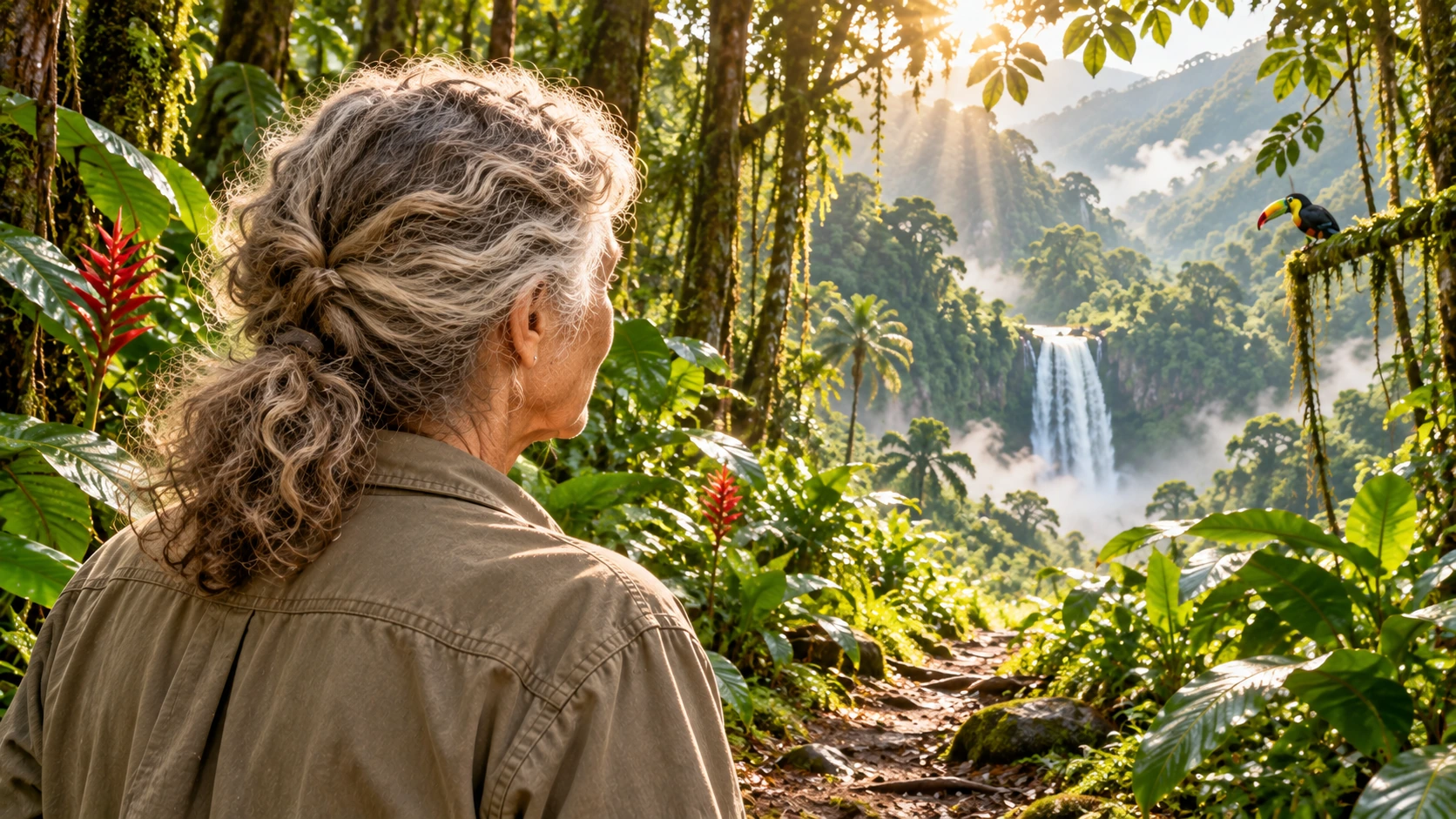
Use the two approved images as a practical continuity reference. Compare hair placement, shirt color, apparent age, skin tone, and light direction. A new angle can reveal different details while still feeling like the same moment.
Turn Still Frames into Patient Documentary Motion
Use Video Prompt Builder to describe the visible action and environmental changes. Use Camera Movement to select one clear camera behavior for each shot. A restrained push toward the portrait, a steady forest view, or a slow reveal through leaves can each serve a different purpose.
Keep the first portrait animation simple. Ask for a soft breath, one natural blink, and a slight movement of leaves behind the guide. Large gestures can distract from the listening moment and make it harder to preserve hands and facial details.
Example opening-video prompt
“Use the approved elderly-guide portrait as the visual reference. In one continuous shot, she holds the quiet listening gesture, breathes gently, and blinks once while keeping her attentive expression. Preserve her facial proportions, silver-gray hair, khaki shirt, and natural skin texture. Leaves move lightly behind her and mist drifts through the forest. Use a very slow, controlled camera push toward her face with no sudden movement. End with her gaze steady. No speech, added characters, extra fingers, text, or logos.”
You can take the prompt and supported references into Higgsfield or another image or video engine you prefer. Select a model and input mode that support the assets you want to use. Duration, audio, and reference controls depend on the chosen tool and your account.
Describe sound separately from the visual action. This scene may use a quiet water bed, gentle leaf movement, and sparse distant calls. If the generator does not provide the sound you need, assemble those layers in your editor.
Follow a Repeatable Production Workflow
- Define one story question. Choose the moment, audience, and intended ending.
- Draft with Claude. Develop narration and a short shot plan, then review the language and any factual claims.
- Prepare prompts in O4Prompts. Set character, composition, lighting, color, action, and camera behavior.
- Generate and approve the stills. Use a suitable image engine and save the character references.
- Create the motion. Copy the video prompts into your selected generator and provide supported references.
- Edit and review. Match continuity, place narration and sound, trim the sequence, and prepare the publication.
This is a manual workflow you can refine from episode to episode. Keep the approved prompts, selected frames, narration, and generation settings together. When a later shot needs correction, you will have the earlier choices available.
For a series, reuse the guide and overall art direction while giving each episode a fresh question. A story about morning light needs different observations from a story about rain. Specific observations help the series develop beyond repeating the same portrait and narration.
Frequently Asked Questions
Can a faceless channel show an AI-created guide?
Yes. In this format, the creator does not appear on camera. An invented guide can provide a recurring on-screen character. Make the AI-created nature of the imagery clear to viewers.
Does O4Prompts generate the documentary?
O4Prompts supplies the prompts. Use separate image, video, audio, and editing tools to produce and assemble the film.
Should I use Claude Fable 5 or Fable 5.1?
Check the models available in your account and choose one that fits your task. Anthropic lists Fable 5.1 as the current Fable version; the script and shot-planning approach here can be adapted to it.
What makes the jungle sequence feel consistent?
A stable character reference, coherent lighting and vegetation, deliberate camera positions, and careful review of the finished clips. Fix the visible differences before assembling the final edit.
Start with one quiet, well-defined story. Develop its script with Claude, build the visual direction with O4Prompts, and use your preferred generation tools to bring the approved shots into motion.