A unified cinematic video prompt gives an AI video generator one coherent piece of creative direction instead of a loose collection of visual keywords. It connects the subject, setting, action, composition, camera movement, lighting, color, atmosphere, and pacing so every part of the shot supports the same idea.
That matters because cinematic AI video is not created by adding the word “cinematic” to an ordinary prompt. A convincing shot needs visual logic. The camera should have a reason to move. The lighting should belong to the environment. The subject’s action should be readable within the duration of the clip. Color, lens choice, depth, and environmental motion should reinforce the same mood rather than compete with one another.
This guide explains how to build unified cinematic video prompts, how to turn a simple idea into structured AI video direction, and how O4Prompts by OrigaStock can help organize those decisions before generation.
What Is a Unified Cinematic Video Prompt?
A unified cinematic video prompt is a structured description of a complete shot. Rather than treating camera angle, movement, lighting, action, and style as unrelated tags, it combines them into a single visual plan.
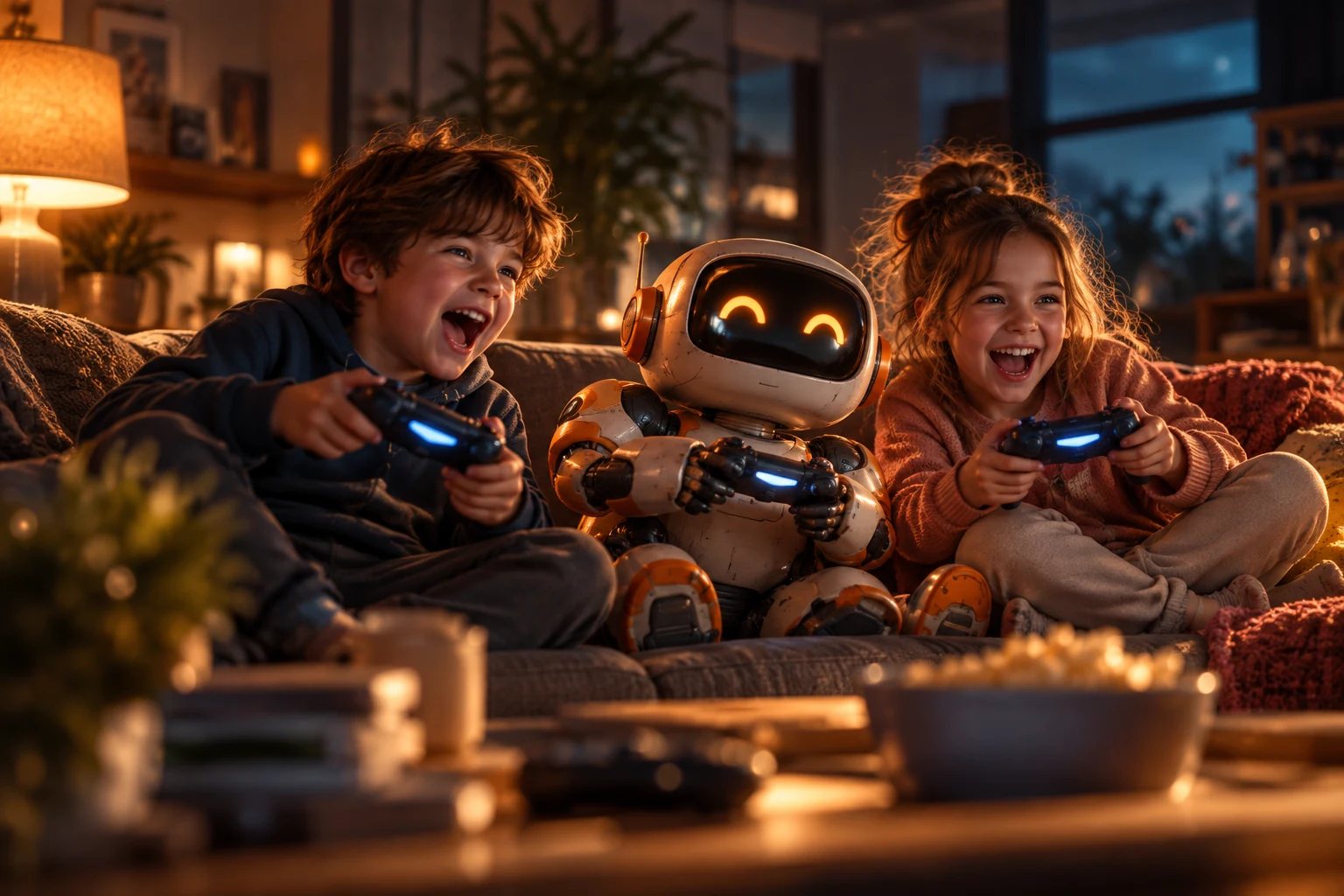
Imagine a simple idea: two children are intensely playing a game in a cozy living room at night. A basic prompt could describe only the characters and room. A unified prompt goes further. It decides how close the camera is, where it is positioned, whether it moves, what motivates the light, how the characters react, which environmental details move, and what emotional tone the final shot should communicate.
The goal is not maximum length. The goal is consistency. Every important instruction should help the model understand the same scene.
Why Cinematic Prompts for AI Video Need Structure
AI video introduces time and motion, which makes prompt design more complicated than prompting a single still image. A beautiful frame can still produce a weak video if the movement is unclear or contradictory.
For example, a prompt might request a quiet emotional portrait while also asking for an aggressive handheld orbit, a rapid zoom, a crane movement, and dramatic environmental action. Each instruction can be cinematic by itself, but together they may create a confused result.
Structure helps establish priorities. Start with what the shot is about. Then decide what happens during the shot. After that, define how the audience sees it. Camera, light, color, and atmosphere become supporting decisions rather than disconnected effects.
The O4Prompts Video Prompt Builder is designed around this kind of workflow: begin with the idea, select useful creative directions, and turn those choices into a more organized prompt that can be adapted for an AI video generator.
The Essential Parts of a Unified Cinematic Video Prompt
1. Subject and environment
Start with the visual information the viewer needs immediately. Identify the primary subject, the location, time of day, and any essential relationship between subjects or objects. “A boy and a girl playing a video game together in a cozy living room at night” is already more useful than “children, cinematic, gaming.” It establishes who, what, where, and when without overloading the opening sentence.
2. One clear action
Describe what actually changes during the clip. The characters might lean forward as the game becomes intense, turn toward one another after winning, or react to something happening off-screen. For short AI-generated clips, one readable action is often stronger than a long sequence of events. If the concept requires several beats, consider treating them as separate shots.
3. Composition and camera angle
Composition tells the model how the scene should be organized. A medium-wide eye-level shot can keep multiple characters and their environment readable. A close-up can emphasize emotion. A low angle can make a subject more imposing, while an overhead composition can create graphic geometry.
You can explore framing ideas in Cinematic Shots and Composition Lab, then carry the chosen direction into the video prompt.
4. Camera movement
Camera movement should support what the audience is meant to notice. A slow push-in can gradually increase attention. A tracking shot can follow a moving subject. A controlled orbit can reveal depth around a character or object. A locked camera can work beautifully when movement inside the frame is already strong.
Avoid stacking several incompatible movements simply because they sound cinematic. One primary movement is usually easier for a model to interpret. The O4Prompts Camera Movement library can help you explore different movement types before choosing one.
5. Lighting and color
Describe lighting as part of the environment. Instead of writing only “cinematic lighting,” explain the source and relationship: warm practical lamps shaping the faces, cool blue night light entering through the windows, or red signage reflecting across wet pavement.
Then choose a color palette that supports those sources. Warm amber highlights against cool blue shadows can create an inviting nighttime contrast. A muted palette may suit a restrained drama. Saturated complementary colors can make a stylized scene more energetic. O4Prompts Color Lab can help explore color directions before incorporating them into the final prompt.
6. Environmental motion and atmosphere
Small movements make generated video feel alive. Curtains can shift in a breeze, steam can rise from a cup, rain can ripple across reflections, dust can pass through a light beam, or distant traffic can create soft moving highlights. These details are especially valuable when the main subject is relatively still.
A Simple Unified Cinematic Video Prompt Formula
A useful order is: subject and setting → primary action → composition → lens or depth → camera movement → lighting → color palette → environmental motion → mood and visual finish.
For example:
Two children sit together on a sofa during a late-night game in a cozy living room, leaning forward and reacting naturally as the match becomes intense. Medium-wide eye-level framing with natural cinematic depth and soft background separation. The camera makes a slow controlled push toward them. Warm practical lamps shape their faces while cool blue night light enters through the windows. Amber-and-blue color contrast, subtle screen reflections, gentle background movement, realistic texture, playful family-film atmosphere and restrained filmic contrast.
The value of this example is its hierarchy. It tells the model what exists, what happens, how the scene is framed, how the camera behaves, and how the world should feel. None of those decisions contradict one another.
How to Improve AI Video Prompt Text
More words are not automatically better. Strong AI video prompt text is specific where specificity matters and restrained everywhere else. Remove generic adjectives that do not change the shot. Terms such as “masterpiece,” “epic,” “amazing,” and “professional” can take space without providing concrete visual direction.
Replace them with observable choices: soft rim light, slow lateral tracking, shallow depth of field, rain on reflective pavement, or restrained handheld motion. Also keep important descriptions consistent. If a character’s clothing, prop, vehicle, or environment matters, use stable terminology.
Using a Cinematic Video Prompt Generator
A cinematic video prompt generator should help organize creative decisions rather than simply inflate a short sentence into a large paragraph. The useful question is not “How long can the prompt become?” but “Does every instruction contribute to the same shot?”
With O4Prompts, you can develop a scene by thinking through camera, composition, color, and other visual components before assembling the direction. The resulting prompt can then be adjusted for the AI video model you choose.
Different generators interpret language differently, so there is no single prompt syntax guaranteed to behave identically everywhere. Treat the unified prompt as the creative blueprint. Shorten, reorder, or adapt individual instructions when a particular model responds better to a different format.
Free Cinematic Prompts vs Copy-Paste Prompts
Copy-paste examples are useful for understanding structure, but the strongest results usually come from adapting them to your own scene. If hundreds of creators use exactly the same subject, camera move, lighting, and mood, the outputs naturally become less distinctive.
Use examples as frameworks. Replace the subject, location, action, composition, movement, and palette with decisions that belong to your concept. A reusable structure is more valuable than a reusable scene.
This also applies to “viral AI video prompts.” A prompt does not become effective simply because another clip performed well. The creative idea, timing, visual clarity, model, generation settings, editing, sound, and distribution all influence the final result.
Common Mistakes in Cinematic Video Prompts
The first common mistake is asking for too many camera movements in one short generation. Choose the movement that best serves the shot. The second is describing a still image and forgetting time. Video prompts should include some form of change: character action, camera motion, environmental motion, or a controlled combination of them.
The third is using cinematic vocabulary without visual meaning. “Hollywood cinematic 8K film look” says less about the actual shot than a clear description of framing, motivated light, depth, movement, and atmosphere. The fourth is creating conflicting moods unless that contrast is deliberately part of the story.
Use References Without Copying Them
Visual references can help you understand lighting, framing, pacing, production design, and mood without reproducing another creator’s exact scene. Study why an image works, then rebuild those principles around your own subject and environment.
For broader filmmaking, music, footage, and creative references, Artlist is one external resource you can explore. It is separate from O4Prompts and is not a direct integration.
Build One Clear Cinematic Idea
A strong unified cinematic video prompt is ultimately about agreement between creative choices. The composition directs attention. The camera movement reveals information. Lighting and color establish mood. Subject and environmental motion give the shot life. The final texture supports the visual world instead of distracting from it.
Start with one clear idea, build the shot around it, and remove directions that do not support that idea. O4Prompts by OrigaStock can help you explore the individual components and turn them into structured creative direction before you move into generation.
Frequently Asked Questions
What is a unified cinematic video prompt?
It is one structured prompt that combines the subject, setting, action, composition, camera movement, lighting, color, atmosphere and pacing into a coherent shot direction.
What should a cinematic video prompt include?
Start with subject and setting, then define the main action, framing, camera behavior, lighting, color and the environmental motion that matters to the scene.
Can I use O4Prompts for AI video prompts?
Yes. O4Prompts can help structure visual direction that you can then adapt for the AI video generator you prefer. It does not imply a direct integration with those generators.
Are copy-paste AI video prompts useful?
They are useful as examples of structure, but adapting the subject, movement, environment and visual direction to your own idea generally gives you more original creative direction.
How do I make an AI video prompt feel more cinematic?
Focus on coherent shot design: purposeful framing, motivated camera movement, believable lighting, controlled color, readable action and environmental motion that supports the mood.