Every creative idea opens another possibility: a closer camera, a different palette, a quieter background, or a more unexpected subject. The challenge is choosing a direction and describing it clearly. O4Prompts by OrigaStock helps creators turn those choices into AI image and video prompts they can use in their preferred generation engine. Start with an idea, build the visual brief, and keep refining the decisions that make the result your own.
Ideas Become Useful When the Direction Is Clear
A creative brief often begins with a feeling: bold, intimate, mysterious, playful, or premium. That feeling becomes actionable when you connect it to something visible. An intimate image might use a tight crop and shallow depth of field. A bold image might use a dominant shape, hard light, and restrained accent colors.
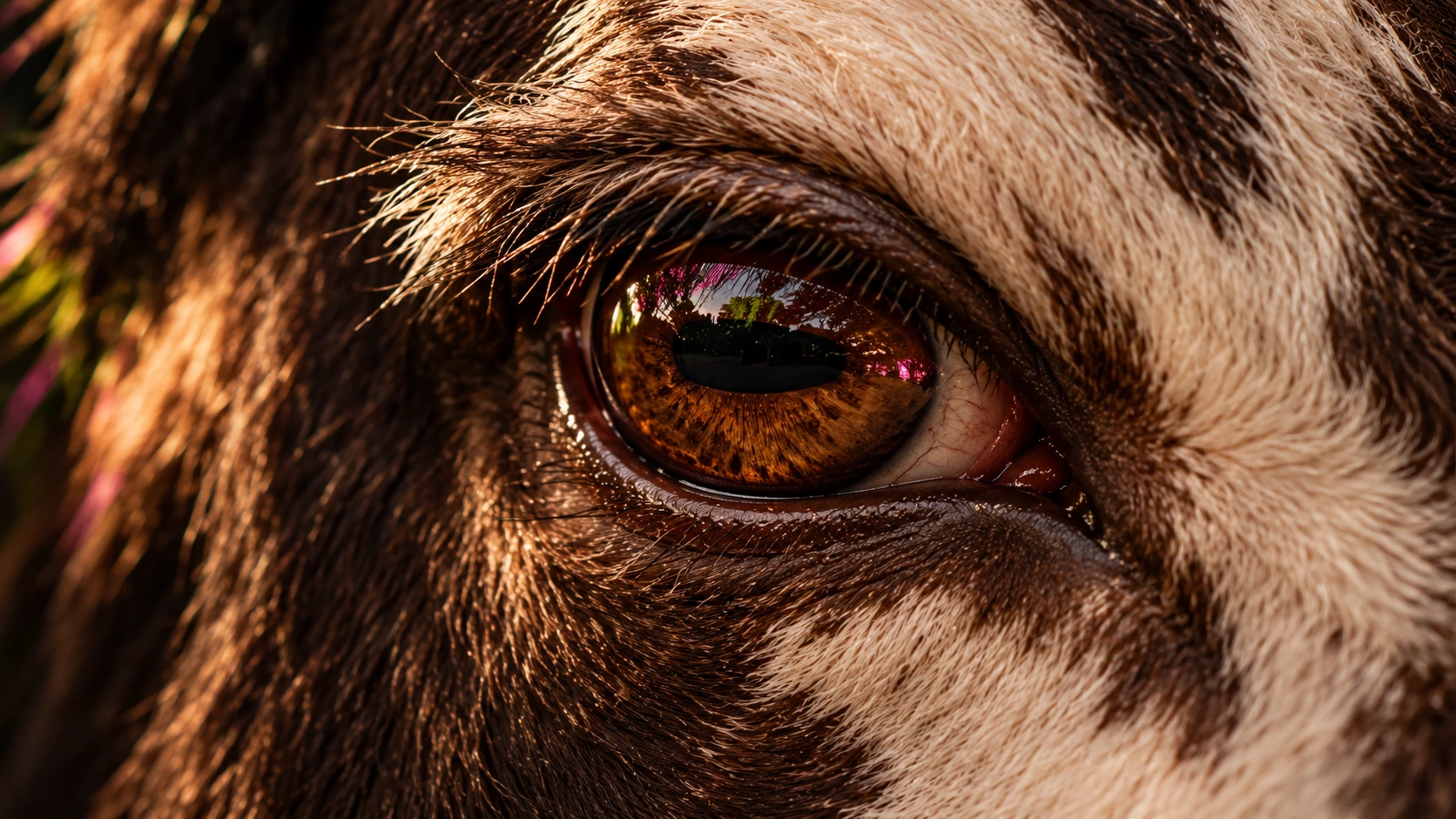
Before writing your prompt, choose the detail the viewer should notice first. Then decide what supports it. For the cow-eye example in this article, the eye is the focal point, natural fur provides texture, and subtle colored reflections add energy. The frame does not need a complete animal, an elaborate setting, or a second subject.
Those decisions give the generator a coherent brief. They also give you a way to judge the result: does the image preserve the focal point, the intended texture, and the mood?
O4Prompts Turns Visual Choices Into Prompt Language
O4Prompts generates prompts, not images or videos. Build the instructions on the website, then copy them into a compatible generation tool. You choose the engine and adapt the prompt to its supported controls.
Define the camera and composition
Use Cinematic Shots to develop the camera perspective and shot language. Decide whether you need a wide environmental frame, a medium portrait, or an extreme close-up. Describe the crop and the viewing angle before adding atmosphere.
Use Composition Lab to organize what appears inside that frame. Specify the focal point, subject placement, negative space, and relationship between foreground and background. For a blog cover, placing the eye toward one side can leave quieter space for the page title.
Connect color to the idea
Use Color Lab to develop a palette with a clear purpose. Warm amber highlights can emphasize the eye's texture, while dark brown shadows keep the frame grounded. Magenta and lime reflections can supply small accents without replacing the animal's natural colors.
Describe where each color appears. “A subtle magenta reflection at the edge of the fur” gives the color a location. Asking for several equally dominant colors can make the focal point harder to read.
Add movement when the brief needs video
A moving version needs more than the still-image description. The Video Prompt Builder helps develop the scene's action, while Camera Movement supports the language of the shot's motion. Define the start, the movement, and the ending frame, then use the prompt in a compatible video engine.
A Practical Workflow From Idea to Generation
- Write the core idea. State the subject, intended mood, and purpose in one sentence.
- Choose the visual rules. Set the framing, composition, lighting, palette, and material texture with O4Prompts.
- Assemble the prompt. Keep the instructions coordinated and remove details that compete with the main subject.
- Generate in your chosen engine. Copy the prompt into the tool, attach a relevant reference when needed, and select the available output controls.
- Refine one visible issue. Preserve the approved direction while correcting the detail that matters most.
You can use the prompt in ChatGPT when image generation is available in your account, or adapt it for another compatible image tool. ChatGPT's official image generation guidance covers creating images, using references, and requesting edits. This is a manual copy-and-paste workflow between the services.
Example: Give a Simple Eye Close-Up a Clear Identity
The starting idea is short: “An extreme close-up of a cow's eye.” The creative direction makes it specific: photographic animal anatomy, tactile fur, a glossy amber-brown iris, dramatic shadows, and restrained colored light reflections.
Replacing a subject while keeping the mood requires you to describe the new subject properly. A cow should have natural bovine features, coarse lashes, surrounding fur, and a horizontally elongated pupil. Human eyebrows, human skin, or decorative tattoo lettering would undermine this particular brief.
A generation prompt could read:
“Create a cinematic extreme close-up photograph of a cow's eye. Show one glossy amber-brown eye with a naturally elongated horizontal dark pupil, coarse eyelashes, realistic eyelid folds, and surrounding cream-and-dark-brown fur. Place the eye in the right half of a landscape frame, with the left side fading into softly focused dark fur. Use warm amber highlights, deep photographic shadows, and restrained magenta and lime reflections from off-camera lights. Keep the fur naturally colored and the eye sharply focused. Preserve individual hair strands, realistic moisture, and subtle imperfections. No people, human facial features, tattoos, painted patterns, text, titles, logos, watermarks, or borders.”
The prompt connects the camera, materials, light, and constraints to the same concept. The colored accents are reflections rather than ink. The tight crop gives the eye importance without introducing a distracting background.
Create Variations Without Losing the Concept
Once a direction works, develop purposeful alternatives. For a companion image, keep the animal, fur colors, eye detail, and lighting mood, then change the angle or crop. A tighter three-quarter view can explore more texture while retaining the visual identity.
For a campaign, change one major decision at a time. Test an off-center composition against a centered version, or compare a warmer palette with a more neutral treatment. Keep the remaining instructions consistent so you can understand the effect of the change.
For video, try a restrained camera push toward the eye and a slow natural blink. Specify which movement is important and keep the rest of the scene stable. Review the generated motion rather than assuming a detailed prompt will preserve every feature automatically.
Better Revisions Begin With Specific Feedback
“Improve the image” leaves too many decisions open. Describe the problem you can see and the result you want. If the texture is too smooth, request individual fur strands and less polished highlights. If the accent colors dominate, reduce their brightness and preserve the amber eye.
A focused edit might be: “Keep the crop, eye shape, natural fur colors, and warm lighting. Reduce the magenta reflection and soften the background detail. Do not add new objects or text.”
Keep the approved prompt and reference alongside the result. A reusable direction should record the decisions worth preserving, while leaving room to change the subject, action, or format for another brief.
Frequently Asked Questions
Does O4Prompts generate the final image?
No. It helps you prepare visual prompts. Copy the instructions into your chosen image or video engine, then generate and review the result there.
Do I need to use one specific engine?
You choose the compatible engine. Adapt the wording, references, aspect ratio, and output settings to the tool you use.
Do better prompts need more words?
They need clearer decisions. Add detail when it resolves uncertainty about the subject, framing, light, or materials. Remove conflicting directions and unnecessary decoration.
Can I use the same direction for several images?
Yes. Keep a consistent subject description, palette, lighting, and texture, then make deliberate changes to the angle or action. Review each output against the approved reference.
Your next visual starts with a choice: what to show, how to frame it, and which details matter. Explore those decisions with O4Prompts and turn your idea into a prompt you can use, review, and refine.