A realistic AI film needs more than a sharp image. The character's expression, the light, the camera, and the movement should feel like parts of the same moment. O4Prompts by OrigaStock helps you describe those decisions before you generate. This guide develops a winter close-up into an original cinematic brief, with practical image and video prompts you can adapt to your chosen engine.
What Makes an AI Film Feel Real?
Believability comes from the relationships inside a scene. A cold wind should affect loose hair and clothing. Light should reveal the face and materials consistently. A character looking down should appear to have a reason for that gaze. The environment should support the action rather than compete with it.
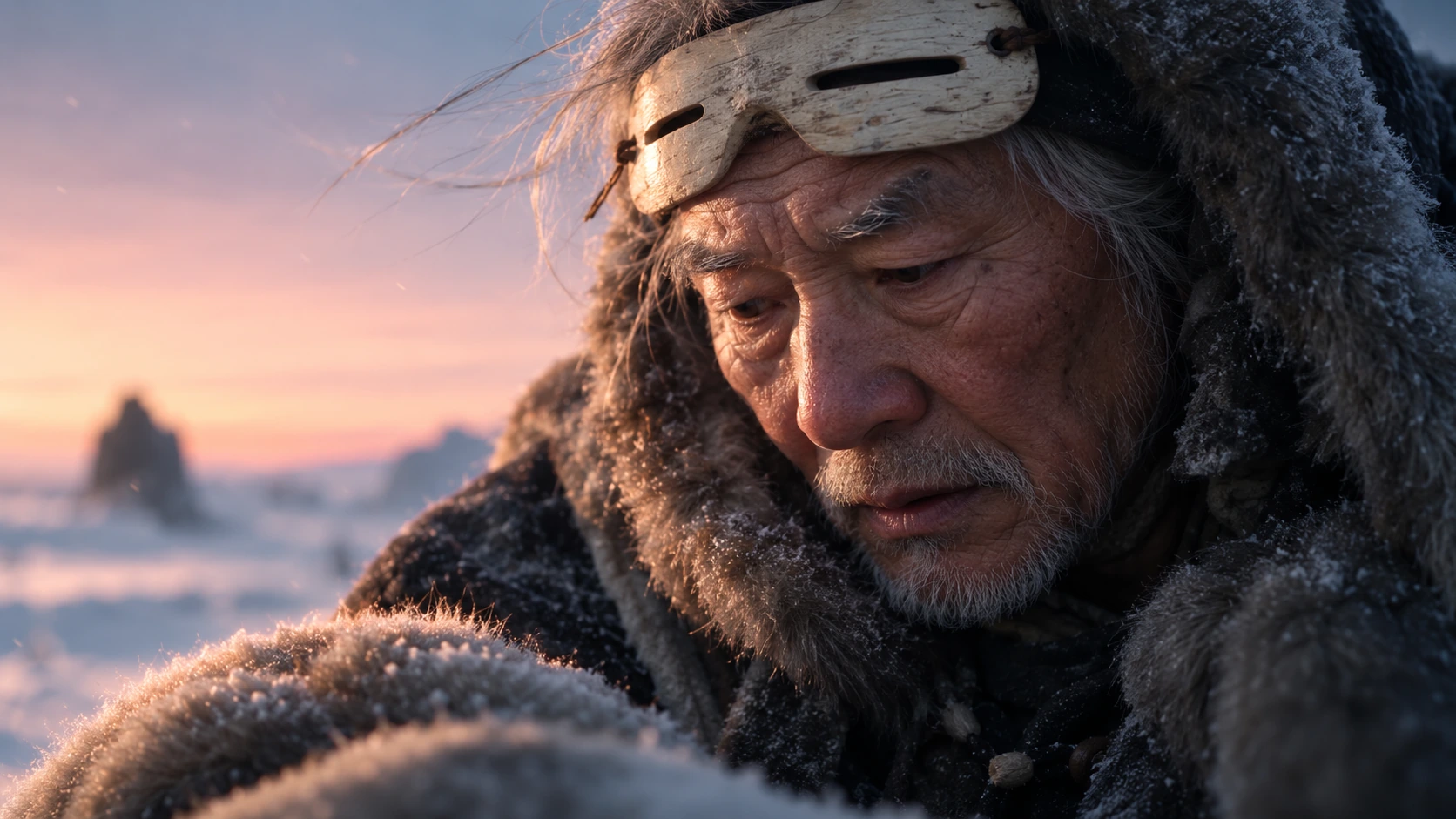
For this example, an elderly traveler leans over a fur bundle in a snowy landscape at dusk. His expression is restrained, his coat is worn, and the low sunlight catches the edges of his hair. The scene communicates a quiet moment of concentration through small visible details.
Decide what the shot needs to communicate before adding technical language. If the purpose is concern, a close view of the eyes and mouth may be more useful than an elaborate camera move. If the purpose is isolation, a wider frame can give the environment more importance.
Direct a Moment, Not Just a Face
A character description establishes appearance; a performance instruction explains what the character is doing. Both matter. Describe the elderly traveler's silver hair, white stubble, weathered skin, winter clothing, and raised wooden eye protection, then give him a simple action: leaning forward and concentrating on the bundle below him.
Keep the expression specific and modest. Slight tension around the eyes and a relaxed, parted mouth can communicate attention without an exaggerated theatrical reaction. “Deeply emotional” leaves the engine to decide how that emotion should appear.
For a moving shot, choose one main action. The traveler might lower his gaze and exhale once while the wind moves a few loose hairs. That is a clearer performance brief than combining a head turn, walking, reaching, speaking, and a sudden expression change in the same close-up.
Give Camera, Light, and Texture a Purpose
Frame the detail that carries the story
Use O4Prompts Cinematic Shots to develop the shot language. A close three-quarter view from slightly above lets the viewer follow the downward gaze and see the face's texture. Keep enough foreground to explain what the character is attending to.
Use Composition Lab to define the face's position and the background hierarchy. In the wider example, the traveler occupies the right side while a distant silhouette provides depth. That background figure should stay secondary.
Make the light belong to the environment
A pale peach dusk sky can motivate warm highlights, while the surrounding snow supports cooler shadow tones. Describe which side catches the light and keep that direction consistent in the next shot. A face lit like a studio portrait may feel detached from the winter setting.
Use Color Lab to coordinate the warm and cool relationship. Keep the skin believable and the blue-gray shadows restrained. The palette should describe the environment and mood without turning every surface into a saturated color effect.
Ask for the right imperfections
Specify pores, fine wrinkles, uneven skin, weathered wood, wool fibers, and a little snow caught in the fur. These details should fit the subject and setting. Avoid treating realism as a request to sharpen every surface equally; the face can be clear while the distant landscape remains softly focused.
A Practical O4Prompts Workflow for AI Filmmaking
O4Prompts generates prompts, not finished films. Use the website to prepare the visual and motion instructions, then copy them into a compatible image or video engine. Generation, timing controls, audio, and final editing belong to the tools you select.
- Define the scene. Write the character's situation, immediate action, environment, and emotional purpose.
- Build the still-image direction. Set the subject, framing, composition, lighting, colors, and material detail with O4Prompts.
- Approve the reference. Generate a still in your chosen engine and correct the face, clothing, and light before developing motion.
- Write the action. Use the Video Prompt Builder to describe what changes during the shot.
- Choose the camera movement. Use Camera Movement to define the path and ending frame.
- Generate and review. Check the full clip for anatomy, motion, continuity, and whether the intended moment remains clear.
You can adapt the prompt for platforms such as Higgsfield. Its official camera-control guide explains that camera direction can use prompt text, explicit settings, or both. Check the controls supported by the model you choose rather than assuming every instruction has an equivalent setting.
Higgsfield's Cinema Studio guide also describes developing the still frame before animation. Preparing a clear reference gives you an approved visual target, while the motion still needs its own review. The O4Prompts workflow here is manual: prepare, copy, generate, and refine.
Example Image Prompt: An Elderly Winter Traveler
Start with this original scene brief and adjust it to your intended framing:
“Create a photorealistic cinematic close-up of an elderly traveler in a snowy landscape at dusk. He has pale weathered skin, deep natural wrinkles, a broad nose, short silver hair, and sparse white stubble. He wears a worn dark wool winter coat with thick gray-brown fur lining and pale wooden eye protection raised above his eyes. He leans forward, looking down at a snow-dusted fur bundle in the foreground with quiet concentration. Use a close three-quarter camera angle from slightly above, with the character on the right and a softly blurred distant winter silhouette on the left. Pale peach sunlight warms one side of his face, balanced by cool blue-gray shadows. Preserve visible pores, uneven skin, coarse wool, individual fur fibers, and subtle film grain. No text, titles, logos, watermarks, interface elements, or smooth plastic skin.”
Review the still before moving on. Check whether the wooden protection sits above the eyes, whether the expression is restrained, and whether the foreground makes sense. If the face appears polished, request less retouching and more natural texture while preserving the approved framing.
Example Video Prompt: Keep the Performance Simple
Use the approved still as a reference where the engine supports it. Describe the movement separately from the established visual appearance:
“Animate the approved winter close-up as one continuous quiet shot. The elderly traveler remains leaning forward, lowers his gaze slightly toward the fur bundle, and exhales once; a faint breath cloud drifts with the cold wind. Loose silver hairs and the hood's fur move gently in the same wind direction. The camera makes a slow, smooth forward dolly from the existing close-up to a slightly tighter view of his face, then settles. Keep his face, clothing, raised wooden eye protection, dusk lighting, and color palette consistent. Fine snow passes through the distant background. Preserve natural eyelid and mouth movement. No cuts, abrupt zooms, additional characters, text, or logos.”
Set duration and other available controls in the engine itself. If the performance becomes too busy, simplify the action. If the camera movement distracts from the face, try a fixed camera and let the environment provide the motion.
Keep Related Shots Visually Consistent
A short film needs continuity between its images and clips. Keep a record of the character's facial features, clothing, props, light direction, weather, and palette. Repeat those decisions in each prompt and reuse an approved reference where supported.
Change the camera deliberately. A wider shot can establish the landscape, the close-up can show concentration, and an insert can reveal the bundle. Each shot has a different purpose while remaining part of the same scene.
Compare neighboring shots for details that can drift: the wooden protection's position, the coat's fastenings, the amount of snow, and the direction of the warm light. Correct the visible mismatch rather than rewriting every instruction at once.
Frequently Asked Questions
Does adding “realistic” make an AI film believable?
It gives a broad style direction. A useful brief also defines performance, framing, light, materials, and movement. Judge the generated result against those specific choices.
Should every cinematic shot have camera movement?
No. A fixed camera can support an intimate performance. Choose movement when it reveals information or serves the emotion of the scene.
Can O4Prompts generate or edit my video?
O4Prompts prepares prompts. Copy them into your selected generation engine, then use your chosen editing tools to assemble and finish the film.
How do I revise an unnatural result?
Name the visible issue, such as drifting facial features, exaggerated expression, or inconsistent shadows. Request a focused correction and preserve the parts of the shot that already match the brief.
Develop your next scene with a clear performance, a purposeful camera, and consistent visual rules. Start with O4Prompts, prepare the instructions, and use your chosen engine to turn that direction into a shot you can evaluate.