Cinematic AI action depends on readable movement, purposeful framing, and a scene that stays visually coherent. A detailed image gives you a starting point; the camera, performance, and edit turn it into a sequence. O4Prompts by OrigaStock helps you describe those choices before generation. This guide builds an original action-film brief around a fictional army squad on a dusty street, with practical prompts and two different camera viewpoints.
Give the Action a Clear Visual Purpose
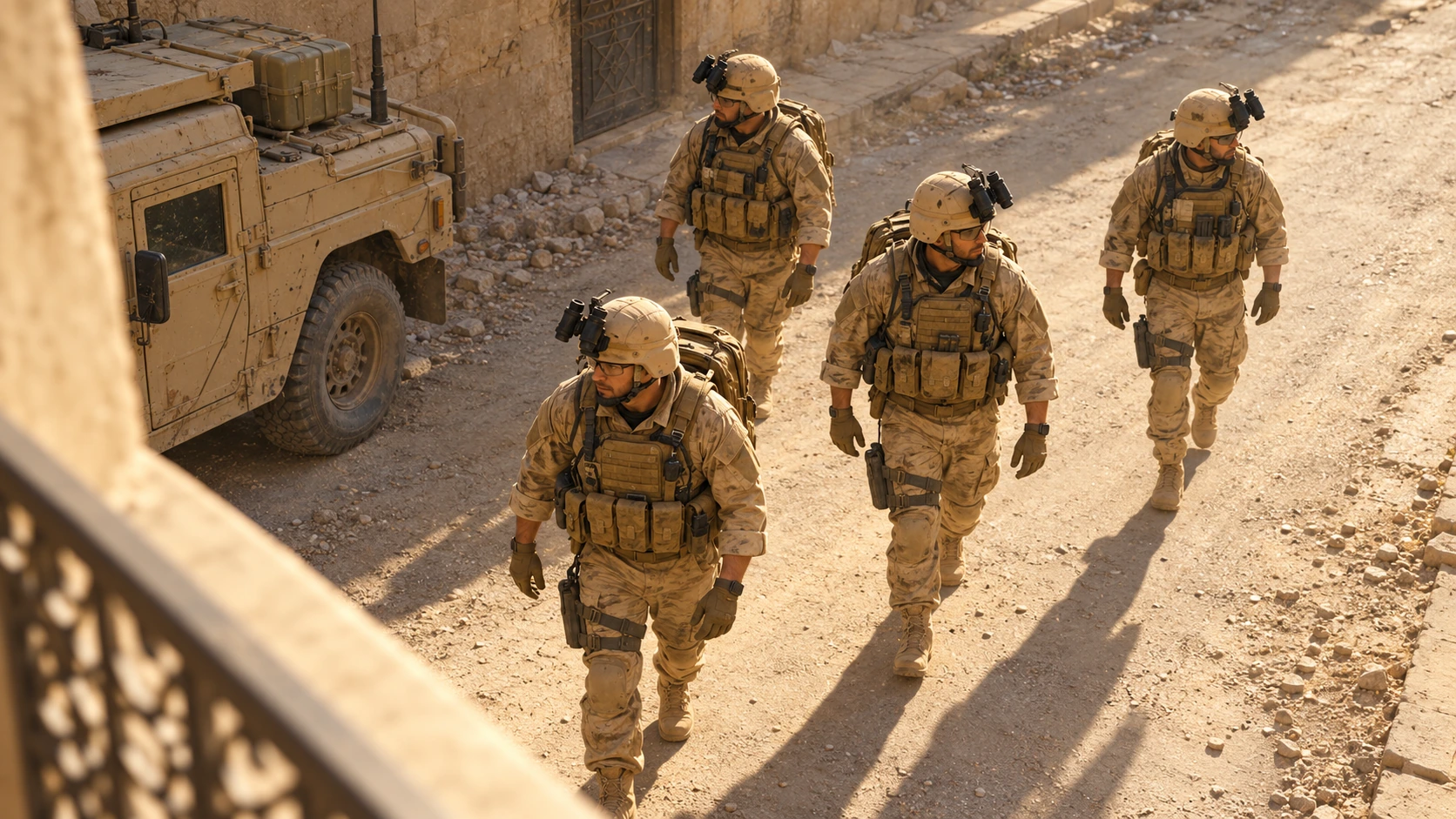
Start by deciding what the audience needs to understand. In our example, four soldiers move through a sunlit street while dust drifts between pale stone buildings and parked military vehicles. The scene communicates urgency through their movement, expressions, and the camera's proximity.
Write the shot's main event in one sentence: “The squad takes several measured steps as the camera follows from behind and the dust briefly thickens.” That gives you a visible action to direct and an ending to evaluate. Add complexity only when it contributes to the moment.
The same planning method can support a running character, a vehicle sequence, or an athlete entering a competition. Decide what changes during the shot, which detail carries the emotion, and what the final frame should reveal.
Keep the Army Consistent across Camera Angles
Record the squad's visual identity before changing the viewpoint. Keep the tan desert camouflage, weathered body armor, helmets with folded black night-vision devices, goggles, gloves, and packs consistent. These repeated details help separate a new camera angle from a redesigned cast.
Use the same environment rules: pale plaster and stone walls, a dusty road, tan utility vehicles, warm sunlight, and a restrained sandy palette. Check details that can drift, including the helmet attachments, sleeve lengths, glove colors, and the vehicles' proportions.
Save an approved reference and use it wherever the generation engine supports image references. Describe which features should remain consistent and which camera properties should change. Review the new image against those instructions; a reference provides guidance rather than a guarantee of exact preservation.
Change the Camera Position, Not Just the Crop
A different camera angle changes perspective and reveals another part of the scene. Moving behind the squad exposes their packs and the street ahead. Raising the camera reveals the road surface and the relationship between the characters and buildings. Enlarging the original image leaves the original viewpoint in place.
A low rear three-quarter view
Place the camera behind and to one side, near knee height. A nearby soldier creates foreground depth while the others recede along the street. The low position brings boots, dust, and fabric movement into the visual story. Keep enough of the surroundings visible to explain where the movement happens.
A high side view
For the second image, move above the scene and look down from the side. This gives the street and the squad a different visual relationship, with clearer ground shapes and longer shadows. Keep the uniforms, vehicles, and light direction recognizable from the first view.
Use O4Prompts Composition Lab to describe the foreground, subject spacing, diagonal lines, and background hierarchy. State the camera's height, side, and viewing direction so the requested change is concrete.
Coordinate Light, Color, and Physical Detail
Give the light a direction that belongs to the location. Warm sunlight can catch the edges of helmets and shoulders while the buildings provide areas of shade. Dust becomes easier to see when light passes through it, but it should leave the main action readable.
Use O4Prompts Color Lab to coordinate the tan uniforms, pale walls, warm highlights, and restrained shadow tones. Keep skin natural and retain enough tonal separation between a soldier and the building behind him.
Describe materials that fit the setting: woven fabric, creased gloves, scuffed painted surfaces, and dust caught on boots. For motion, those materials should respond plausibly. Loose fabric can shift with each step, packs can move slightly, and a small dust plume can rise where a boot meets the road.
Use motion blur selectively. A moving boot or passing foreground detail can suggest speed while the main subject remains recognizable. Strong blur across every face and object can make the shot harder to assess.
Prepare the Scene with O4Prompts
O4Prompts generates prompts for images and videos. Use it to prepare the creative direction, then copy the instructions into a compatible generation engine. Image creation, video duration, available camera settings, and final rendering belong to the tools you choose.
- Define the moment. Write the visible action, environment, mood, and intended ending.
- Build the image direction. Use Cinematic Shots for framing, light, texture, and lens language.
- Set the composition and palette. Keep the squad readable against the street and preserve the visual identity.
- Generate a still. Supply a compatible reference where supported and inspect the result.
- Add motion. Use the Video Prompt Builder for the action and Camera Movement for the camera path.
- Review and edit. Check the generated clip, correct visible issues, and assemble the approved shots.
Higgsfield's official camera-control guide explains that camera direction can use prompt text, explicit settings, or both. Use the available controls for the selected model and keep the written movement consistent with them.
Its Cinema Studio guide describes a still-first approach to developing a shot. In the workflow here, approve the frame before spending effort on movement. That leaves you with a clear visual target to compare against the clip.
Example Image Prompt: A New View of the Squad
Use this original brief as a starting point and adapt the details to your reference:
“Create a photorealistic cinematic action-film still of four fictional male soldiers on a dusty street lined with pale stone and plaster buildings. Preserve the reference squad's tan desert camouflage, weathered armor, tan helmets with folded black night-vision devices, goggles, gloves, and packs. Change the camera to a low rear three-quarter view from behind and to the squad's right, near knee height. Show one soldier in the near foreground mostly from the back, with the other three farther along the street. Keep tan military utility vehicles in the distance. Warm sunlight catches the helmet edges and drifting dust; shadows remain natural and the fabric retains visible texture. The soldiers are moving with alert expressions. No firing, injuries, text, logos, watermarks, or interface elements.”
Check whether the viewpoint has actually changed. You should see backs, packs, and different overlaps between characters and buildings. Compare equipment and light direction with the approved reference before developing another shot.
Example Video Prompt: Follow One Readable Action
Start from the approved still where image-to-video input is supported. Describe a short performance and a single camera move:
“Animate the approved squad scene as one continuous cinematic shot. The four soldiers take several measured steps along the dusty street. The camera follows smoothly from the existing low rear three-quarter position, maintaining its height and relative distance to the nearest soldier. Boots raise small amounts of dust; clothing and packs shift subtly with the steps. Preserve the characters, tan uniforms, helmets, equipment, vehicles, buildings, and warm sunlight. End with the camera settling into a brief hold. Keep the action physically readable, with no cuts, abrupt zooms, additional people, firing, injuries, or text.”
Set clip duration and supported controls in the engine. Watch the whole result for sliding feet, equipment changing shape, duplicate characters, and unstable perspective. If the camera overwhelms the action, simplify its movement. If several performances conflict, reduce the amount that changes within the shot.
Revise a specific issue at a time. “Keep the camera at its current height and reduce the dust around the nearest face” gives a clearer correction than replacing the entire scene description with more adjectives.
Build the Sequence in the Edit
A short sequence can begin with a wide street view, move into the rear tracking shot, cut to the high side angle, and finish on a restrained reaction. Each viewpoint should add information while remaining part of the same moment.
Keep screen direction coherent. If the characters move toward one side of the frame, make sure the next shot remains easy to understand. Compare the sunlight, dust density, helmet details, and vehicle positions between neighboring shots.
Use sound to support weight and movement: footsteps, fabric, a distant engine, and the atmosphere of the street. Trim shots to the story's rhythm and review the complete sequence for clarity before export.
Frequently Asked Questions
Does cinematic action need constant camera shake?
No. A controlled tracking shot or a fixed camera can communicate urgency. Choose movement according to what the viewer needs to follow.
How do I keep the same army in another image?
Reuse the approved reference where supported, repeat the squad's visual details, and specify the new viewpoint. Inspect each result for changes to characters, uniforms, and equipment.
Can O4Prompts generate the action film?
O4Prompts prepares the prompts. Use a compatible image or video engine to generate the assets, then assemble them in your chosen editor.
Start with one readable action and a camera that gives it purpose. Build the visual brief with O4Prompts, develop a distinct second viewpoint, and use your selected engine to turn the approved direction into cinematic shots.